

What happens when a customer orders an item and your usual supplier is out of stock?
That is where dropshipping gets messy. Another supplier may carry the same SKU, but someone still has to check stock, compare shipping, review margin, send the order, and return tracking. A few orders are manageable. Hundreds are not.
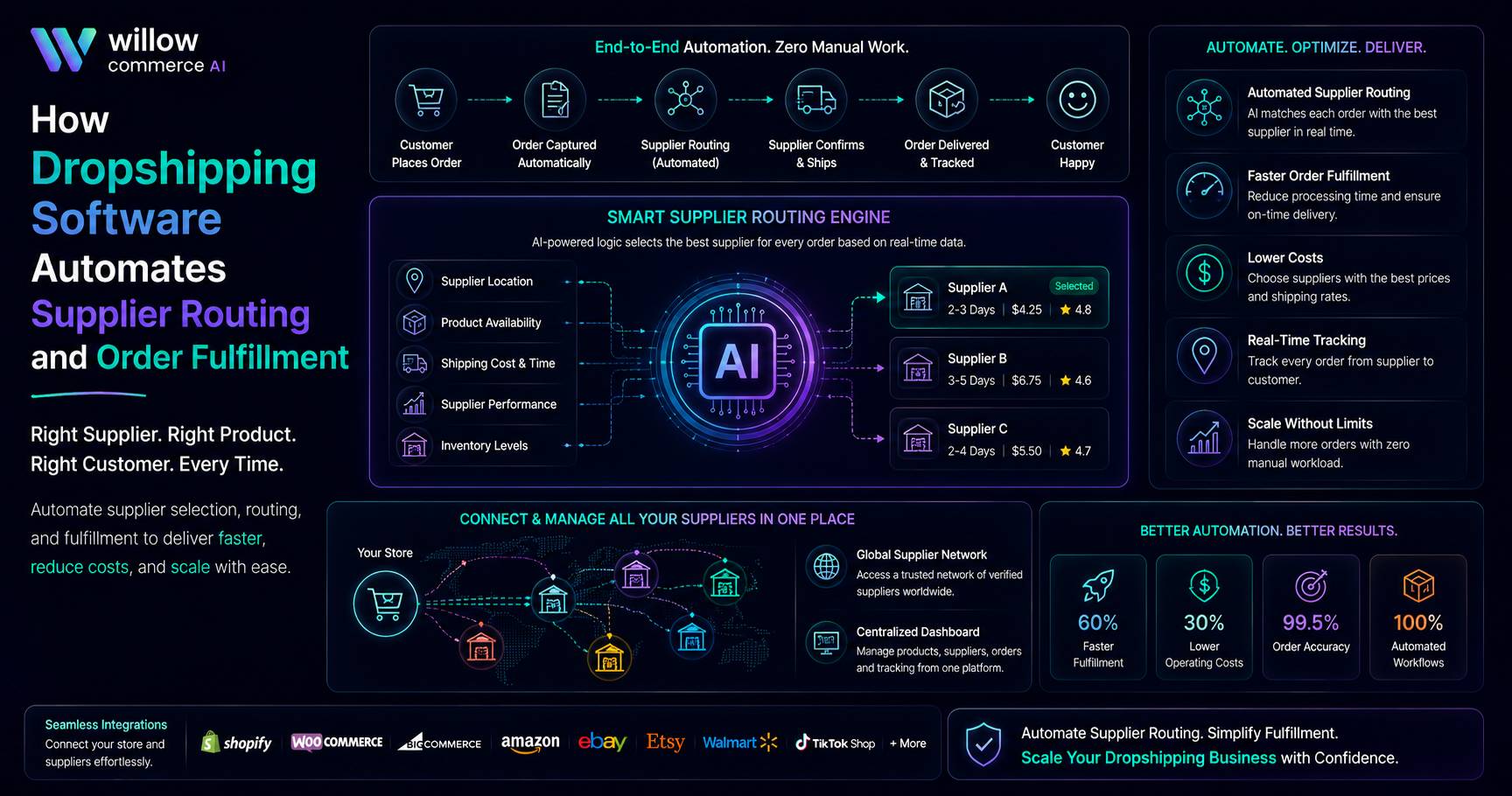
Dropshipping software turns those decisions into a repeatable flow. A dropship order automation tool can read supplier data, apply routing rules, release orders, and push shipment details back to the marketplace or store. The point is to stop the same checks from eating up the day.
How Dropshipping Software Connects Supplier Data With Order Fulfillment
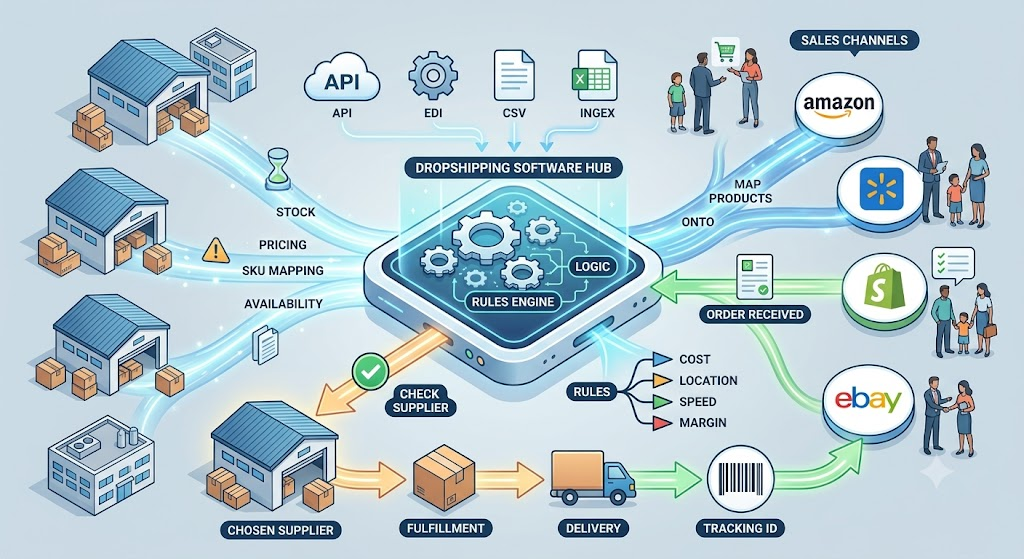
Routing depends on good data. A platform needs stock, pricing, lead times, shipping rules, SKU mappings, and supplier availability. Those records may arrive through APIs, EDI, or CSV files. Once mapped to products on Amazon, Walmart, Shopify, eBay, or another channel, they become usable routing data.
When an order lands, a dropship order automation tool can check eligible suppliers and apply rules around cost, location, delivery speed, and margin. Supplier data shapes routing. Routing determines fulfillment. Fulfillment creates tracking, which returns to the sales channel.
Key Ways Dropshipping Software Automates Supplier Routing and Fulfillment
Supplier routing gets harder once order volume starts climbing and several vendors are handling the same products. Automation takes care of the repetitive checks, so each order can move to the right supplier without constant manual input.
Routes Orders Based on Live Stock Availability
Stock comes first. A supplier cannot ship unavailable stock. Good routing logic checks availability first. If the preferred vendor is out, the system can move to another qualified source before staff needs to step in.
One 250,000-square-foot warehouse used AI-powered inventory automation and reduced daily backorders from several hundred units to about 98. Dropshipping works differently, but better inventory data still prevents poor fulfillment decisions.
How a Dropship Order Automation Tool Selects Suppliers by Cost, Location, and Delivery Time
Price alone is weak. Supplier A may charge less for the item, while Supplier B ships from a closer location and reaches the buyer two days sooner. Add freight, marketplace fees, and margin targets, and the cheaper unit may create the more expensive order.
Strong routing logic compares the full order, ranking suppliers by availability, shipping expense, delivery window, margin, and service requirements. That gives growing teams a consistent sourcing method.
Syncs Inventory Across Multiple Supplier Feeds
Supplier feeds rarely arrive in one neat format. One vendor may use an API. Another may rely on EDI. A smaller source may still send CSV files. Dropshipping software has to normalize those feeds and keep channel inventory close to what suppliers can ship.
Stock buffers help. When a vendor updates inventory only a few times a day, publishing every available unit can be risky. A reserve can reduce overselling when several channels pull from the same supplier pool.
Sends Orders Directly to Suppliers for Fulfillment
Manual entry gets harder at scale. Staff copy addresses, SKUs, quantities, and shipping methods into supplier portals, then return later for tracking. Every handoff adds error risk.
A dropship order automation tool can send the order through the supplier’s accepted connection and record the response. At Amazon’s highly automated Shreveport facility, automation reduced fulfillment-related operating costs by about 25%. Dropshipping runs differently, but repetitive fulfillment work still carries a cost.
Updates Tracking Information Across Sales Channels
The job is not finished at supplier acceptance. Tracking must come back, match the right customer order, and reach the marketplace or storefront. When teams handle that step manually, they end up chasing supplier emails and updating orders one at a time.
Good dropshipping software closes the loop. It captures tracking, links it to the order, and sends the shipment update to the selling channel. Support teams can see what happened without digging through email threads, and operations can trace late shipments faster.
Reduces Manual Order Processing and Routing Errors
Manual routing produces inconsistent choices.
One employee favors cost. Another chooses speed. Someone else sticks with the familiar vendor. That variation gets expensive as volume grows.
A dropship order automation tool applies the same rule set to eligible orders. Teams can still hold high-value, thin-margin, or unusual orders for review. Routine work moves. Staff handles exceptions.
How Willow Commerce Supports Automated Dropshipping Operations
Willow Commerce treats dropshipping as a connected operating flow, not a basic order-forwarding feature. We bring supplier data, inventory, orders, fulfillment, and tracking into one environment so teams can manage sourcing without jumping between separate tools.
The platform supports:
- Supplier feeds through CSV, API, and EDI
- Routing by stock, shipping cost, delivery time, and margin
- Inventory and pricing synchronization across sales channels
- Blind dropship fulfillment with tracking returned to the channel
- Hybrid fulfillment across dropshipping, FBA, FBM, 3PLs, and owned warehouses
We also support no-code workflows, REST API access, webhooks, carrier connections, and multi-channel operations. Routine orders can follow preset rules while exceptions remain visible to operators. We keep the routing logic visible, so teams are not guessing why a supplier was chosen.
Supplier performance, margin controls, routing history, and fulfillment status stay tied to the same flow. As order volume and supplier count rise, that shared record also gives teams one place to check what changed, who handled it, and where an order stalled.
What to Look for as Order Volumes Grow
Do not judge a platform only by how many orders it can forward. Look at the decisions it makes and how easily people can step in when something goes wrong.
| Capability | What to Check | Operational Value |
| Supplier connectivity | API, EDI, CSV, webhooks | Supports different vendor systems |
| Routing logic | Stock, cost, margin, region, lead time | Improves supplier selection |
| Inventory controls | Buffers, thresholds, channel sync | Limits overselling |
| Exception handling | Holds, alerts, manual review | Stops silent failures |
| Tracking workflow | Supplier-to-channel updates | Keeps shipment data current |
| Reporting | Supplier performance, routing history | Helps teams refine rules |
A strong dropship order automation tool should also allow manual overrides. Automation should remove repetitive work, not trap a team inside a bad rule.
Conclusion
Supplier routing gets difficult long before a business admits it has become a problem. More channels, SKUs, and vendors all put pressure on the same order flow.
The right dropshipping software connects supplier data with routing, fulfillment, tracking, and exception handling without adding more administrative work.
At Willow Commerce, we keep sourcing rules visible while leaving room for people to step in when an order needs attention. When your operation needs a cleaner supplier-to-customer flow, talk with us and see what we can build together.
FAQs
Can one customer order ship from more than one supplier?
Yes. Some platforms can split line items between suppliers when stock or routing rules require it while keeping separate tracking records.
What happens if a supplier rejects an automated order?
The system can hold the order, alert the team, or route it to another eligible supplier.
Can supplier routing protect a minimum profit margin?
Yes. Routing logic can factor in product cost, shipping expense, fees, and margin thresholds before approving a supplier.
Does dropshipping automation work with marketplaces and online stores?
Yes, as long as the platform supports order, inventory, and tracking connections for each sales channel.
When should a seller automate supplier routing?
It becomes useful when staff spend too much time checking stock, comparing suppliers, re-entering orders, or fixing routing decisions.